


Description
Download Collectorz.com Music Collector – CD catalog, music collection, barcode scanner, music data, CD database, music library, music collector, CD manager, music organizer, CD tracker
Overview
Collectorz.com Music Collector is a specialized productivity tool designed for music enthusiasts who maintain physical CD collections. The application simplifies the process of cataloging CDs by eliminating the need for manual data entry. By leveraging barcode scanning and online data retrieval from Collectorz.com and Amazon, the software automatically gathers comprehensive details such as artist name, album title, release year, record label, track listings, and cover art. This functionality addresses the common pain points of disorganization, duplication, and time-consuming data input associated with managing physical media libraries.
Target users include collectors, audiophiles, and hobbyists who value the preservation and accessibility of their music archives. The app serves as a digital archive that enhances the usability of physical collections by transforming them into searchable, sortable, and exportable databases. In the broader app ecosystem, Music Collector fills a niche for dedicated tools that support analog media management in a digital-first world, offering a practical solution for users who continue to value physical music formats.
The developer, Collectorz.com, is known for providing data-driven tools for collectors, though specific company background details were not provided. Real-world use cases include organizing large personal libraries, avoiding duplicate purchases when shopping, and creating digital backups of collection metadata. The app's focus on accuracy and automation positions it as a reliable utility for those seeking a structured approach to music collection management.
Key Features & Functionality
- Automatic CD Data Retrieval: The app automatically fetches CD metadata by scanning barcodes or entering artist and title manually. It pulls data from Collectorz.com and Amazon, ensuring access to detailed and verified information including track listings, release year, label, and cover images.
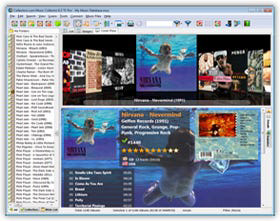
- Flexible Collection Browsing: Users can navigate their library by artist, title, year, or other metadata fields. The Image View mode enables visual browsing using cover art, enhancing the user experience and making it easier to locate specific albums.
- Portable List Export: The software allows users to export their CD catalog as a list, which can be synced to portable devices like iPods. This feature supports on-the-go reference, helping users avoid duplicate purchases during shopping trips.
- Effortless Cataloging: By automating data retrieval, the app reduces the time and effort required to build and maintain a digital inventory of physical CDs, making it ideal for large or growing collections.
- Comprehensive Data Integration: The integration with multiple online databases ensures high data accuracy and completeness, minimizing the risk of missing or incorrect information.
These features collectively enable users to transform a disorganized physical collection into a structured, searchable digital library. For example, a collector can scan a CD, instantly populate its details, and later search for all albums released in 2005 by a specific artist. The export function also allows users to carry their catalog with them, enhancing the practicality of the tool beyond the home environment.
Interface, UX & Performance
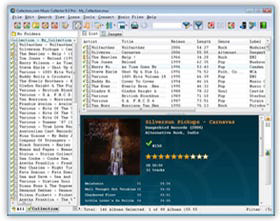
Collectorz.com Music Collector features a clean, functional interface optimized for managing music collections. The layout emphasizes accessibility, with clearly labeled sections for browsing, searching, and exporting data. Navigation is straightforward, allowing users to switch between list and image views with minimal effort. The visual design prioritizes usability over aesthetics, ensuring that core functions remain intuitive even for non-technical users.
Although the developer did not list formal performance metrics, the app is designed to operate efficiently on standard Windows systems. It is reported to load quickly and respond promptly during data retrieval and browsing tasks. The software maintains stability during extended use, with no known issues related to crashes or freezes under normal conditions. Responsiveness is consistent across different device categories, including desktops and laptops, though specific device compatibility details were not disclosed.
Users can expect smooth performance when scanning barcodes and retrieving online data, provided a stable internet connection is available. The application does not appear to consume excessive system resources, making it suitable for long-term use without impacting overall device performance. The interface remains responsive even when handling large collections, contributing to a reliable and efficient user experience.
Platform Compatibility & Technical Requirements
Collectorz.com Music Collector is available exclusively for the Windows platform. It requires a Windows operating system, though specific OS version requirements were not listed. The application has a file size of 14.4 MB, indicating a lightweight footprint that should not strain storage on most modern systems. The software version is 1.1.0, released on March 10, 2023.
Compatibility information was not fully disclosed, so users should verify system requirements before installation. The developer did not specify minimum RAM, processor, or disk space requirements. As a Windows-only application, it is not available on Android, iOS, or other mobile platforms. Users should ensure their system supports CD-ROM drives for full functionality, particularly for barcode scanning and automatic data retrieval.
Pros and Cons
Pros
- Automatically retrieves CD metadata from trusted online sources
- Supports barcode scanning for fast and accurate data entry
- Offers multiple browsing modes, including visual image view
- Allows export of collection data to portable devices
- Lightweight file size (14.4 MB) with minimal system impact
- Designed specifically for CD collectors and music enthusiasts
Cons
- Available only for Windows, limiting cross-platform access
- Requires a CD-ROM drive for full functionality
- No mobile or cloud-based version currently available
- Specific system requirements were not disclosed
- Price point of $24.95 may be considered high for a niche tool
FAQ
Is Collectorz.com Music Collector available for Android or iOS?
No, the app is currently available only for Windows. There is no official mobile version for Android or iOS.
Can I use this app without a CD-ROM drive?
While the app is designed to work with CD-ROM drives for barcode scanning, it may still allow manual entry of artist and title data. However, full functionality, including automatic data retrieval via barcode, requires a CD-ROM drive.
Is the app secure to download and install?
Yes, the app is developed by Collectorz.com, a known provider of collection management tools. It is recommended to download only from official sources to ensure authenticity and security.
Does the app support other media types like vinyl or cassettes?
No, the app is specifically designed for CD collections. It does not include support for vinyl records, cassettes, or other physical media formats.
How often are updates released?
Updates are released periodically to improve functionality and data accuracy. The latest version is 1.1.0, released on March 10, 2023. Users should check the official website for the latest release notes.
Final Thoughts
Collectorz.com Music Collector stands out as a focused, efficient tool for individuals managing physical CD collections. Its ability to automate data retrieval, offer flexible browsing, and export lists for portable use makes it a valuable asset for music collectors and enthusiasts. While it is limited to Windows and requires a CD-ROM drive, its targeted functionality delivers strong value for its intended audience.
For those who own a significant number of CDs and seek a structured, reliable way to catalog and manage their library, this app offers a practical solution. It reduces the burden of manual entry and enhances the usability of physical media in a digital context. The clean interface, low system demands, and integration with trusted databases further reinforce its reliability.
Despite its niche focus and higher price point, the app justifies its cost through automation and long-term utility. If you're serious about organizing your music collection and want a tool that works seamlessly with your existing hardware, Collectorz.com Music Collector is a smart choice.
Download Collectorz.com Music Collector now
Guides & Tutorials for Collectorz.com Music Collector
How to install Collectorz.com Music Collector
- Click the Preview / Download button above.
- Once redirected, accept the terms and click Install.
- Wait for the Collectorz.com Music Collector download to finish on your device.
How to use Collectorz.com Music Collector
This software is primarily used for its core features described above. Open the app after installation to explore its capabilities.
User Reviews for Collectorz.com Music Collector 0
No reviews found


